Earlier this week, version 86.0 of the Firefox web browser was released.
I have a great affection for Firefox, as I started using it in the early 2000s before version 1.0 was released when the browser market was dominated by Microsoft’s unloved but ubiquitous Internet Explorer.
Firefox is also bundled as the standard web browser in many Linux distributions including my long-term preferred distro, Debian.
According to the release notes, there have been several privacy improvements and other enhancements in the latest version.
Following on from an initial proposal by Collabora for a Wayland driver for the Wine emulator (which enables Windows applications to be run on Linux. Ed.), the company’s developers have now posted a Request for Comment (RFC) on the upstream mailing list, Germany’s Linux Magazin reports.
The goal of this driver is to allow Windows applications to run directly on Wayland compositors, eventually removing the need for XWayland for many uses.
The goal of this driver is to allow Windows applications to run directly on Wayland compositors, eventually removing the need for XWayland for many use cases. Consequently, it should not be assumed that XWayland will get support for modern features. In a post on Collabora’s blog, chief developer Alexandros Frantzis mentions HDR imaging as such a function. Furthermore, as an additional layer, XWayland represents an unnecessary complication and possible breeding ground for inefficiency.
This RFC contains additional details of how the Wayland driver should work with Wine. Copy/paste, Drag-and-drop and changing the display mode are mentioned. Copy/paste support is already working well in both directions, according to Frantzis, i.e. both from native Wayland applications to Wine applications and vice versa. Drag-and-drop works from a native Wayland application to a Wine application in many established formats. Progress on these aspect of the driver can be seen in the video below released by Collabora.
On 18th February NASA’s Perseverance Rover touched down in Mars’ Jezero Crater.
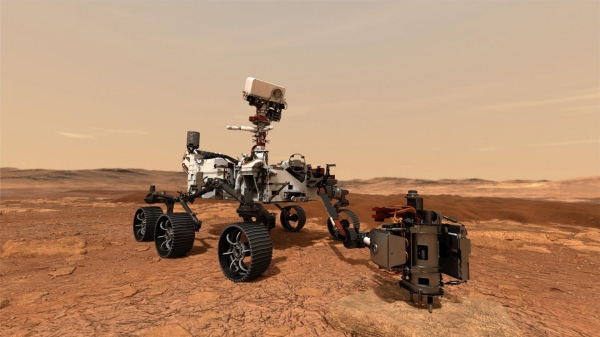
Perseverance rover
However, what is less well known is the role played by Linux and open source software in the Perseverance mission to the Red Planet, particularly as regards its hitch-hiking companion – the Ingenuity helicopter.
This has been revealed by Steven J. Vaughan-Nicholas in a piece for ZDNet.
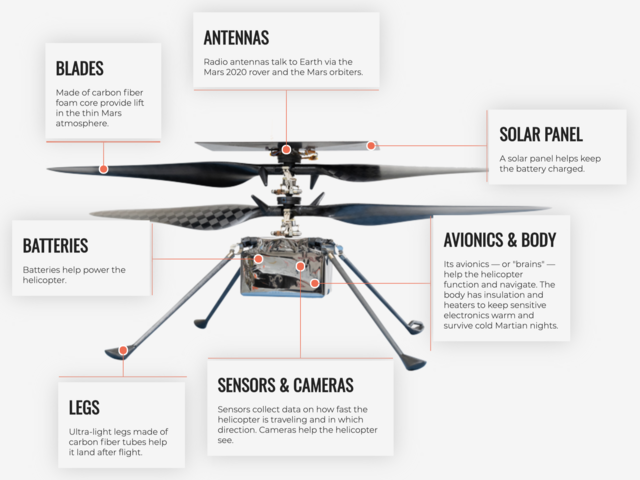
The Ingenuity Mars helicopter. Click on the image for the full-sized version.
Ingenuity weighs 1.8 kg and is attached to the belly of the 1,025 kg Perseverance rover. If its mission is successful, Ingenuity will be the first man-made vehicle ever to fly on another planet. It will fly itself using a combination of Linux and a NASA-built program based on the Jet Propulsion Laboratory‘s (JPL) open-source F´ (F prime) framework.
This will not be easy. Mars’ atmosphere is so thin, its density is one per cent that of the Earth’s whilst its gravity is one-third that of Sol III. Ingenuity is expected to make one or more flights within 30 days as a technology demonstration, according to NASA.
Timothy Canham, a JPL Embedded Flight Software Engineer, stated the following in an interview with IEEE Spectrum:
This the first time we’ll be flying Linux on Mars. We’re actually running on a Linux operating system. The software framework that we’re using is one that we developed at JPL for CubeSats and instruments, and we open-sourced it a few years ago. So, you can get the software framework that’s flying on the Mars helicopter, and use it on your own project. It’s kind of an open-source victory because we’re flying an open-source operating system and an open-source flight software framework and flying commercial parts that you can buy off the shelf if you wanted to do this yourself someday.
It still remains to be seen whether Perseverance succeeds in its mission to find traces on ancient life on Mars and if Ingenuity’s flight(s) will be successful, but yesterday Ingenuity ‘phoned home’ from the Red Planet.
Nicolas Vivant, the CIO of Fontaine, has been part of the transition to open source that the local public sector has implemented over the past 10 years. The local authority opted for open source due to openness and transparency, as well as value for money.
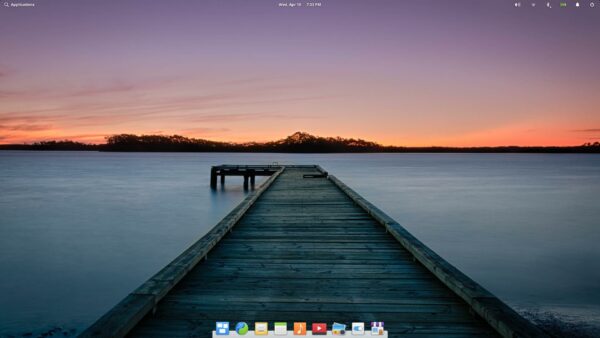
Default elementary OS| desktop
The switch to open source started in the town hall with a change from proprietary browsers and email clients to Mozilla’s Firefox and Thunderbird. The schools’ switch to elementary OS represents stage 2.
Some of the software used by teachers presented some problems according to Vivant, as it was only designed to run on Windows, so the wine emulator had to be used to get it working.
However, Vivant remarked in an online event that for most users the switch to a Linux system has provided a better overall experience.
In addition to installing Linux on school machines, the schools are also running their infrastructure Debian servers.
According to Joinup, one of the benefits of using open source is that children’s privacy is better protected due to leaving a smaller digital footprint online, an important consideration when every third internet user in the EU is estimated to be a child.
Ever since I first starting using Linux seriously 16 years ago, KDE has always been my preferred desktop environment.
I’ve dabbled with GNOME and other desktops, but always come back to KDE for usability, customisability and good looks.
Now known as Plasma, the KDE desktop will soon be reaching the release of its 5.21 version.
Below is a sneak preview of what can be expected when the new version is released, together with a tribute at the end to Gustavo Carneiro. a KDE developer who unfortunately passed away from Covid-19 in January and whose work concentrated on KDE’s Konsole terminal emulator.
This 5.21 release of Plasma is dedicated to Gustavo’s memory.
Today The Document Foundation (TDF), the organisation behind the free and open source LibreOffice productivity suite, celebrates its 9th birthday.
On 17th February 2012 The Document Foundation was registered in Berlin as a German charitable foundation (Stiftung).
TDF had been created by members of the OpenOffice.org community to manage and develop LibreOffice, partially out of fears that Oracle Corporation would cease development of OpenOffice.org after its takeover of Sun Microsystems, the custodians of the OpenOffice.org project. The original OpenOffice.org project is now curated by the Apache Software Foundation.
The TDF’s goal is to produce a vendor-independent office suite with ODF support in a development environment free from control by an individual company.
This goal has been achieved too. LibreOffice is now on release version 7.1, is included as the standard office suite in many GNU/Linux distributions and been downloaded millions of times.
GIMP, also known as the GNU Image Manipulation Program, is a great free and open source graphics creation and editing suite suite, which comes as part of the standard software installation package for many GNU/Linux distributions, although it is also available for other operating systems.
My main use for GIMP is for dealing with graphics containing text in files submitted for translation, as well as tweaking digital photographs.
Nevertheless, every now and again the urge strikes me to learn a bit more to make the most of the software installed on my systems.
If, like me, you have ever wondered how to add a speech bubble to an image using GIMP, help is at hand in the form of the handy video tutorial below.
Now you too know how to put words into other people’s mouths . 😀
The way a completed translation has been produced has changed markedly over the decades since my first days as a translator for Imperial Tobacco in Bedminster, Bristol.
In those days I’d write out the translation in longhand from printed source material and take my manuscript to the typing pool where it would be transformed into typescript.
The next big change came with my learning how to touch-type. By this time I was a freelance with no more access to a typing pool.
In my early freelance days, it was rare to get editable copy that one could overkey with one’s usual word processor, spreadsheet or presentation package. The standard way of working was still from hard copy propped up in a copyholder alongside one’s keyboard.
Then there came a large surge in the use of formats such as PDF – Portable Document Format. This format enables documents, including text formatting and images, to be presented in a manner independent of application software, hardware and operating systems.
If the PDF was text-based, one could simply export the text as plain ASCII text or copy and paste it into a word processor.
However, if I had an image-based PDF to work with, my usual answer was to print it out as hard copy to be propped up in a copyholder alongside my keyboard. This was very expensive in terms of paper and other consumables for the printer, even with a machine as parsimonious as my trusty mono laser printer, whose cartridge was good for printing 3,000 or so pages of copy.
In addition to the expense of printing, there was a far greater drawback to bear in mind, i.e. one could easily miss a sentence or paragraph from the original text when keying in the translated from a hard copy original, with the consequent implications for the quality of the finished work and the client’s satisfaction with it.
Then I discovered OCR – Optical Character Recognition – the mechanical or electronic conversion of images of typed, handwritten or printed text into machine-encoded text.
Here’s a short video explaining the basics of OCR.
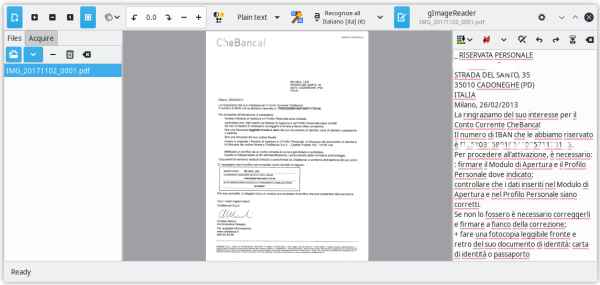
Recognized text displayed directly next to the image;
Post-processing of the recognised text, including spellchecking;
Generating PDF documents from hOCR documents.
I generally just stick scanning the input file to plain text, which can then be fed into a regular office suite for translation. If your office suite can handle HTML that’s the format gImageReader outputs as its hOCR output.
The tesseract OCR engine mentioned above can also be enhanced with language packs for post-recognition spellchecking, as mentioned in the features above. At present, tesseract can recognise over 100 different languages.
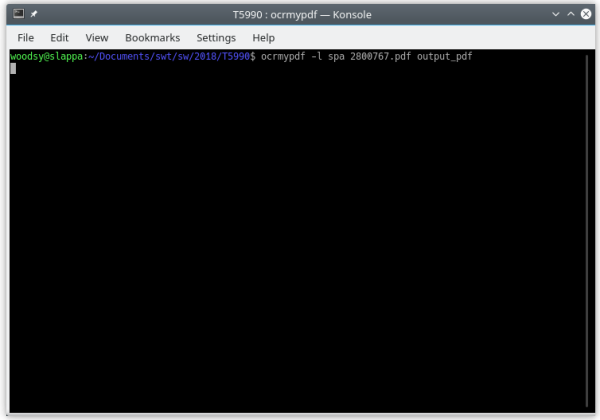
In addition to GUI-based OCR, there are also Linux packages available which can perform OCR via the command line interface.
More complicated command options are possible, but after using that simple string above, you’ll be able to extract the text from your formerly image-based PDF ready for translation.
By way of conclusion depending on the software itself, OCR packages can also extract text from images such as .jpg files.
Some weeks ago, I blogged about the keyboard shortcut for guillemets – French quotation marks – on a Linux keyboard (posts passim).
My attention in this post is on the German umlaut, also known as diaresis (or in French as a trema. Ed.) the two dots placed over a vowel modifying its pronunciation.
Once again, one could always use the character map to insert a specific vowel with an umlaut.
KCharselect with an upper case A umlaut selected
However, the keyboard shortcut is much quicker.
To produce the letter a with an umlaut – “ä“, follow these steps.
Depress AltGr key and the left-hand square bracket “[” followed by “a“.
The AltGr and left-hand bracket symbol plus the vowel of your choice will give you that character plus an umlaut.
For the upper case version, I find the easiest way to avoid knotting your fingers is to turn on the CapsLock key before the AltGr key and the left-hand square bracket “[” plus vowel sequence.