Linux

  • Evolve OS changes name to Solus

    This blog reported yesterday that the developers of the Evolve OS Linux desktop operating system had received a letter from lawyers acting for the UK’s Department for Business, Innovation & Skills informing them that BIS’ OS trade mark was being infringed and that the developers would have to pick a new name.

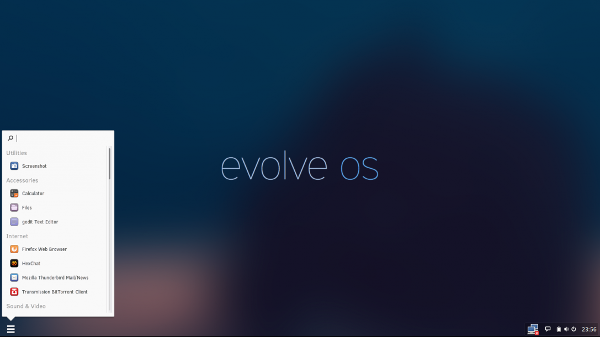
    Evolve OS screenshot

    Ikey Doherty of the development team has now posted the following statement on Google+:

    Thank you, everyone for helping us in the naming process! In that time, one name cropped up time and time again. A name we do own, and one indicative of our history and roots. Most importantly, the longevity, history and direct, traceable link of this name provides absolute and irrefutable evidence of prior art, and all rights to the name within this context. We have purchased solus-project.com and solus-project.net. Thus, Evolve OS will now be known (once again) as Solus. The full name for the operating system component of the project (i.e. the Linux distro) is Solus Operating System – the entirety of the project is the Solus Project.

  • Debian Jessie target release date announced

    Debian logoNiels Thykier of the Debian release team has announced the release date for the forthcoming version 8 of Debian, codenamed Jessie. Jessie should be ready on Saturday 25th April. The could only change, Thykier writes, if something really critical pops up or it is not possible to publish the release on time for technical reasons.

    There is still time until 18th April for final bug fixes; there should be no further changes to Debian in the final week before release. Managers of packages with bugs must therefore work speedily on getting them fixed. Until the release packages with critical bugs could still be removed from the distribution. Thykier writes that there are currently at least twelve release-critical bugs which could result in the removal of the packages concerned from Debian 8.

  • GNU nano 2.4.0 text editor released

    Four years after the last major update to version 2.3.0, the developers of the GNU nano text editor have now announced the release of version 2.4.0. In his email Chris Allegretta nano now has a fully functional undo system which is now enabled by default, vim-compatible file locking, linter support, formatter support, syntax highlighting flexibility and many fixes for bugs reported since version 2.2.

    nano screenshot

    Besides the source code package (in tar.gz), the new version of nano is available from the GNU nano website for various Linux distributions and Windows. The latest unstable release of the 2.3 branch is also available for download.

  • LibreOffice 4.4.1 – a vast improvement

    Yesterday my laptop’s install of LibreOffice was upgraded from version 4.3.3.2 (which is the latest version available for Debian Jessie) to the latest available version – LibreOffice 4.4.1.

    As there is no specific Debian repository that I can find for newer versions of LibreOffice, this process had to be done manually.

    The first stage was to download the zipped .deb packages required, i.e. the main installer, followed by the British English user interface. These were then unzipped in preparation for installation.

    However, before installation could take place, the older version of the suite had to be removed. This was done via the command line by opening a terminal and typing (as root):

    apt-get remove --purge libreoffice-core libreoffice-common

    Now the new version could be installed, once again via a terminal opened in the folder to which the main program’s .deb packages had been unzipped. This time the command – once more as root – is again straightforward:

     dpkg -i *

    Once the main program had been installed, the British English user interface could then be installed by running the dpkg command in the folder containing the relevant .deb, substituting the asterisk for the relevant package name.

    And that was it: I now had the latest release running.

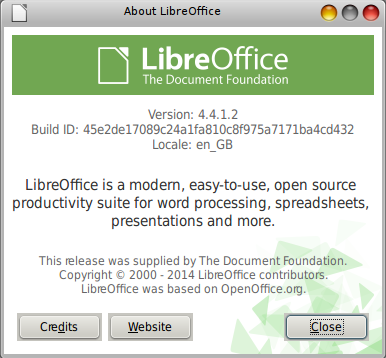
    screenshot of LibreOffice About window

    As regards this release itself, The Document Foundation blog reported that over 100 bugs had been fixed compared with version 4.4.0.

    As someone whose days are spent slaving over a word processor and quite often has to use text effects such as subscript and superscript, I’m very pleased to see that these are included as standard on one of LibreOffice Writer’s toolbars.

    screenshot of LibreOffice Writer toolbar

    Putting on my linguist’s hat, another great addition to Writer’s toolbars is the special character menu shown by the capital L bar icon (Ł). This opens up the character selector – in my case kcharselect – for those special characters whose keyboard shortcuts one doesn’t happen to know. 🙂

    toolbar showing the capital L bar icon for special characters

    My overall impression is that LibreOffice 4.4.1 is the best LibreOffice to date. The redesigned toolbars will help make me more productive since I won’t need to go hunting around through menus quite so much, which can slow one down.

    My thanks to The Document Foundation and its developers for a great piece of work.

  • LibreOffice and OpenOffice now available as web services on Firefox OS

    The Mozilla blog has announced that rollApp, a US cloud provider, is making the free and open source LibreOffice and OpenOffice office packages available as web services on smartphones running Firefox OS. Apps for Android devices will follow.

    As regards LibreOffice, the packages available for Firefox OS and able to run in a web browser are Writer (word processing), Calc (spreadsheet), Impress (presentation) and Draw (drawing).

    OpenOffice screenshot

    The programs themselves run on the rollApp server as web services. Apps for Android smartphones and tablets should follow shortly. Dropbox, Google Drive und Microsoft’s OneDrive can be used as storasge locations. Along with OpenOffice and LibreOffice, 18 other programs can be run under Firefox OS using the rollApp service, which costs about $7 per month after a free trial period of 14 days has expired.

    In addition to the applications for Firefox OS, rollApp offers a wide range of other open source packages, including graphics packages such as Gimp and Inkscape, plus games.

  • Bodhi Linux 3.0.0 released

    One of the great things about using a GNU/Linux operating system is that there is generally a purpose-built distribution available should you have specific needs.

    One such specific need is a lightweight operating system for older hardware and a great distribution for using on such machines is Bodhi Linux, which has announced the release of version 3.0.0.

    Bodhi Linux logo

    Minimum system requirements for running Bodhi Linux 3.0.0 are:

    • 1.0GHz processor;
    • 256MB of RAM;
    • 4GB of drive space.

    However, the following are recommended:

    • 1GB of RAM;
    • 10GB of drive space;
    • OpenGL enabled graphics card.

    Bodhi Linux screenshot

    Bodhi Linux is a lightweight distribution based on Ubuntu (the new release is based upon Ubuntu 14.04 LTS. Ed.) that uses the Enlightenment window manager. The distribution’s philosophy is to provide a minimal base system that users can populate with the software they want. Thus, by default it only includes software that essential to most Linux users, including a file browsers, a web browser and a terminal emulator. It avoids software or features that its developers deem unnecessary.

  • Free software is my Valentine

    Today is 14th February. Most people know this as Saint Valentine’s Day, when florists are overworked and restaurants overcharge. 😉

    However, every year 14th February is also I Love Free Software Day.

    It’s the day when free software users are encouraged to say thank you to the people that produce the great software that millions of people and businesses use and rely upon every other day of the year.

    I love free software campaign banner
    Do you love free software too? Show it!

    I’d therefore like to express my love for free software and say thank you to:

    Along with the rest of the world, I’m indebted to you all.

    If you use free software too, support this annual campaign, which can be followed on social media with the #ilovefs hashtag.

  • OpenStack Debian image available

    OpenStack logoDebian developer Thomas Goirand has announced on his blog that a Debian disk image of the free and open source OpenStack cloud computing software platform is now available from Debian at cdimage.debian.org.

    Thomas writes:

    About a year and a half after I started writing the openstack-debian-images package, I’m very happy to announce to everyone that, thanks to Steve McIntyre’s help, the official OpenStack Debian image is now generated at the same time as the official Debian CD ISO images. If you are a cloud user, if you use OpenStack on a private cloud, or if you are a public cloud operator, then you may want to download the weekly build of the OpenStack image from here:

    http://cdimage.debian.org/cdimage/openstack/testing/

    Note that for the moment, there’s only the amd64 arch available, but I don’t think this is a problem: so far, I haven’t found any public cloud provider offering anything else than Intel 64 bits arch. Maybe this will change over the course of this year, and we will need arm64, but this can be added later on.

    Now, for later plans: I still have 2 bugs to fix on the openstack-debian-images package (the default 1GB size is now just a bit too small for Jessie, and the script exits with zero in case of error), but nothing that prevents its use right now. I don’t think it will be a problem for the release team to accept these small changes before Jessie is out.

    When generating the image, Steve also wants to generate a sources.tar.gz containing all the source packages that we include on the image. He already has the script (which is used as a hook script when running the build-openstack-debian-image script), and I am planning to add it as a documentation in /usr/share/doc/openstack-debian-images.

    Last, probably it would be a good idea to install grub-xen, just as Ian Campbell suggested to make it possible for this image to run in AWS or other Xen based clouds. I would need to be able to test this though. If you can contribute with this kind of test, please get in touch.

    Feel free to play with all of this, and customize your Jessie images if you need to. The script is (on purpose) very small (around 400 lines of shell script) and easy to understand (no function, it’s mostly linear from top to bottom of the file), so it is also very easy to hack, plus it has a convenient hook script facility where you can do all sorts of things (copying files, apt-get install stuff, running things in the chroot, etc.).

    Again, thanks so much to Steve for working on using the script during the CD builds. This feels me with joy that Debian finally has official images for OpenStack.

    I’m a great fan of Debian GNU/Linux (byline: the universal operating system. Ed.), having used it or its derivatives (e.g. Ubuntu, Mepis) as my main operating systems since my wholesale move to free and open source software.

Posts navigation