Tech

  • Software Heritage announced by Inria

    Software Heritage project logoYesterday Inria, the French National Institute for computer science and applied mathematics, announced (French press release. Ed.) the launch of Software Heritage, an initiative collect, organise, preserve and make easily accessible the source code of all software that is publicly available.

    Sending messages to family and friends, paying bills, purchasing goods, accessing entertainment, interacting with central and local government, finding information, booking travels: nowadays almost every act of our daily life relies on computers and software.

    However, that is just the tip of the iceberg. Software controls the electronic equipment embedded in the machines we use to travel, communicate, trade and exchange. Software lies at the heart of medical equipment and devices; it ensures proper operation of the energy, transport and telecommunication networks; it powers the banks and financial institutions; software is crucial for the working of large public and private organisations of all sizes, be that on mobile devices or in the cloud.

    In summary, software is a key enabler for all aspects of our modern world: our industry, our science, our lifestyle; all of our society depends on software.

    The challenge

    The goal of the Software Heritage project is to build a modern “Library of Alexandria” featuring software, which will form a unique reference database of all source code, a tool for new software projects and a research instrument for computer science.

    Software Heritage is an essential building block for preserving, enhancing and sharing the scientific and technical knowledge that is embedded to an ever-greater extent in software; it also contributes to our ability to access all the information stored in digital form.

    Software Heritage will adopt a distributed infrastructure in order to ensure the long-term availability and reliability of its archive.

    Software Heritage will provide a reference knowledge base for all open source software used in industry, thus enabling better lifecycle management and long term preservation of industrial software. Once live update capabilities are enabled, Software Heritage is bound to become the reference archive for all industrial users, helping software developers of new software projects find, re-use and archive new source code.

    Software Heritage is the foundation on which we can build a unique research instrument for studying all the software source code, enabling significant advances in all domains of computer science and leading to better quality, security and safety in the software on which we depend in our daily lives.

    As of yesterday when the project was announced, Software Heritage had already collected more than 20 million software projects, archiving more than 2.5 billion unique source files, along with all their development history. Software Heritage therefore represents the richest collection of source code on the planet.

    Antoine Petit, INRIA’s CEO, remarked: “We decided to start working on Software Heritage more than a year ago and we have now shown its feasibility. In order to scale up worldwide, the time has now come to open it up to the widest, national and international contributions.”

    Two early partners have already committed their support to Software Heritage and will help it grow. They are Microsoft, (which really needs no introduction. Ed.) and <a href="http://Two early partners have already committed their support to Software Heritage, and will help it grow: Microsoft, one of the largest software industries in the world, and DANS, an institution of the Royal Academy of the Arts and Sciences and the Netherlands Organisation for Scientific Research, dedicated to preserving and promoting sustained access to digital research data.

    Inria is now calling all stakeholders worldwide to assist the project in tasks such as, for example, helping to identify the thousands of different sites where the world’s software heritage is now spread around and contributing to the infrastructure. As regards the latter, the project’s own source code is shortly going to be released to the world and developers that share the project’s vision and want to help in this mission will be welcome.

    FSFE support

    The announcement of the project has been welcomed by the Free Software Foundation Europe (FSFE), which has released a statement of support.

    The FSFE highlights a vital reason for supporting the project, i.e. that software is prone to disappear, either because it stops being profitable, or projects get cancelled, or the code is deemed obsolete and gets erased, or is left to fade on storage that physically degrades over time.

    Originally posted on the Bristol Wireless blog.

  • GNOME & KDE join TDF Advisory Board

    Yesterday The Document Foundation, the organisation behind the free and open source LibreOffice suite, announced that GNOME Foundation and KDE e.v. have joined the Advisory Board of The Document Foundation (TDF).

    TDF logo

    In a reciprocal move to consolidate their relationships, TDF also acquired seats on the boards of both the GNOME Foundation and KDE.

    These reciprocal arrangement with the GNOME Foundation is intended to create stronger ties between the two communities and to foster the integration between LibreOffice and one of the most popular desktop environments for Linux.

    Gnome logoGNOME is a desktop environment that is composed entirely of free and open source software, targeting Linux but also supported on most derivatives of the BSD operating system. Since the release of GNOME 3.0, the GNOME Project has focused on the development of a set of programs known as the GNOME Core Applications, for the adherence to the current GNOME HUD guidelines and the tight integration with underlying GNOME layers.

    The GNOME Foundation is a non-profit organisation that furthers the goals of the GNOME Project, helping it to create a free software computing platform for the general public that is designed to be elegant, efficient and easy to use.

    KDE logoKDE has been creating free software since 1996 and shares a lot of values in respect of free software and open document formats with The Document Foundation. In addition, it brings the experience of running a free software organization for almost two decades to the TDF advisory board.

    Both TDF and KDE are involved in the OASIS technical committee for the Open Document format (ODF), as well as collaborating on common aspects of development of office software, such as usability and visual design. The affiliation of KDE and The Document Foundation at an organizational level will help progress the shared goal of giving end users control of their computing needs through free software.

  • Latest version of Snoopers’ Charter before Parliament this week

    This week the House of Commons is due to debate the Investigatory Powers Bill, the latest version of the Snoopers’ Charter (news passim), that will allow the United Kingdom’s police and services to regard the entire UK population as potential organised criminals, suspected terrorists and other assorted ne’er-do-wells and enable those same services to monitor the UK residents’ internet traffic and telecommunications.

    In advance of the parliamentary debate and to publicise the illiberal nature of Home Secretary Theresa May’s bill, the Open Rights Group installed a public toilet on a busy Friday afternoon in Brick Lane in east London. However, the public toilet was not all that it seemed; it was a toilet with a difference.

    The Open Rights Group has also provided a helpful, fact-packed page for MPs on the Snoopers’ Charter to brief them ahead of the debate.

    Originally posted by the author on Bristol Wireless.

  • Italian Defence Ministry on LibreOffice migration

    Italo Vignoli has written today about the Italian Defence Ministry’s migration (posts passim) from the proprietary MS Office suite to a free and open source alternative, LibreOffice.

    LibreOffice logo

    On 30th May, General Sileo of the Italian Defence Ministry gave a presentation on migrating to LibreOffice at Milan University within the scope of meetings organised by the university’s centre for innovation and organisational change in the public sector (Icona Centre), with this particular event being organised by the Department of Economics, Management and Quantitative Methods for the public management degree course.

    General Sileo explained how the adoption of the migration procedure enabled the project to be implemented on the basis of Italian and international best practice, combining the best experience of the community – such as LibreUmbria – and making all elements common factors to avoid surprises, problems and rejection during the migration.

    At the end of the migration, which involves some 150, workstations, the Italian Defence Ministry will have saved €26-29mn., which will then be available for use on “strategic” activities.

  • Introducing The Document Liberation Project

    Document Liberation Project logoToday many people have digital content they created years ago and stored in obsolete and proprietary document formats. Very often these old file formats cannot be opened by any application on the user’s current operating system, leaving the users locked out of their own content.

    However, it is not just individuals that are affected: public and private sector organisations are similarly afflicted; and this can have huge consequences when, say, a a government is unable to read or access digital data it has created in the past.

    This is where The Document Liberation Project comes into its own.

    The Document Liberation Project was created to enable, people, private and public sector organisations to recover their data from proprietary formats and to provide a means of converting the recovered data into open and standardised file formats, such as Open Document Format, thus returning effective control over the content to the actual authors from the software computer that devised the proprietary formats.

    To achieve this, The Document Liberation Project develops software libraries that applications can use to read data in proprietary formats.

    The following video explains how this process works.

    Read more about The Document Liberation Project and the list of projects it supports.

  • Collabora Online 1.0 “Engine” for hosters and clouds released

    Collabora Productivity, the driving force behind putting the free and open source LibreOffice productivity suite in the cloud, has announced the release the first production grade version of Collabora Online, its flagship cloud document suite solution. Codenamed “Engine”, it is targeted specifically at hosting and cloud businesses who wish to support both commercial and consumer document viewing, creation and editing services in their portfolios.

    “Collabora Online 1.0 is the culmination of several years’ intensive work”, remarked Michael Meeks, Collabora Productivity’s General Manager. “Our objective is to enable key document suite service delivery for hosters by integrating seamlessly with their existing groupware, storage, file sharing and other customer solutions. Critically, Collabora will tailor the look and feel of the integration to complement a hoster’s identity and desired product experience.”

    Calc spreadsheet being used online
    Calc spreadsheet being used online

    For this release Collabora Productivity has also updated its demo, which now includes, amongst other things:

    • Header menus;
    • Right click menus;
    • Tables
    • Comments

    Interested potential users can request access to the demo from Collabora.

    Reposted from Bristol Wireless.

  • LibreOffice 5.1.3 available for download

    The Document Foundation (TDF) has today announced the immediate availability of LibreOffice 5.1.3, the third minor release of the LibreOffice 5.1 family, which now supports Google Drive remote connectivity on GNU/Linux and MacOS X operating systems.

    LibreOffice 5.1.3 is targeted at technology enthusiasts, early adopters and power users. For more conservative users and for enterprise deployments, TDF recommends the “still” version – LibreOffice 5.0.6. For enterprise deployments, The Document Foundation also recommends professional support by certified people.

    For those users interested in helping to test forthcoming releases, there are also development versions and nightly builds available. However, these are not recommended for use in a production environment, where stability and reliability are required.

    LibreOffice Impress presentation software
    LibreOffice Impress presentation software

    Download LibreOffice

    LibreOffice 5.1.3 is available for immediate download.

    LibreOffice users, free software advocates and community members can also support The Document Foundation with a donation.

    LibreOffice Conference 2016

    In 2016 the annual LibreOffice Conference will be hosted by the Faculty of Information Technology at Brno University of Technology in the Czech Republic from 7th to 9th September.

    The Call for Papers is open until 15th July 2016 and registration for the conference is now open.

  • Open source helps Bristol academics win award

    photo of Marcella Oliviero and Andrea Zhok from Bristol Uni Department of ItalianOpen source software was an essential element in the work of 2 Bristol modern languages tutors who have just won an award.

    The University of Bristol has announced that Marcella Oliviero and Andrea Zhok have won first prize in the 2016 Apereo Teaching & Learning Awards (ATLAS) for a project that helped first-year students in the Department of Italian teach elements of grammar to their peers. With support from University staff, students were encouraged to develop their own tutorials using Xerte, an open source software package for the creation of interactive teaching and learning materials, which has been developed by the University of Nottingham. As a result, students gained a greater stake in their own learning, improved their subject knowledge and acquired new IT skills.

    Xerte bannerApereo is a network that develops and maintains e-learning software used in thousands of educational institutions worldwide. Packages like Xerte permit the use of a wide range of functions and media to make the learning experience richer and more diverse than is possible with traditional methods. The tutors’ success was announced at the 2016 Xerte Conference in Nottingham and they have also been invited to present their work at the Open Apereo conference in New York later this month.
    Initially posted on Bristol Wireless.

  • LibreOffice 5.0.6 released

    Yesterday The Document Foundation announced the availability LibreOffice 5.0.6 “still”, the sixth release of the LibreOffice 5.0 family, which can be used for the deployment in large organisations and for more conservative software users.

    The Document Foundation recommends large-scale deployment of LibreOffice 5.0.6 with professional level 3 support from certified developers (a list of qualified developers is available at https://www.libreoffice.org/get-help/professional-support/). When migrating to LibreOffice from proprietary office suites such as MS Office, organisations are further advised to seek professional support from certified migration consultants and trainers, which are listed on the same web page.

    In addition, there are companies providing LibreOffice LTS (Long Term Support) versions with incremental updates which are targeted at enterprise deployments.

    People interested in technical details about the release can see the bugs fixed in RC1) and those fixed in RC2.

    Download LibreOffice

    LibreOffice 5.0.6 is available for immediate download.

    LibreOffice users, free software advocates and community members can support The Document Foundation by making a donation. In addition, LibreOffice merchandise is now available from the brand new project shop.

    LibreOffice Conference

    The 2016 LibreOffice Conference will be hosted by the Faculty of Information Technology at Brno University of Technology in the Czech Republic from 7th to 9th September. The conference is being organised by OpenAlt.

    Details of the Call for Papers, which is open until 15th July 2016, are available at https://blog.documentfoundation.org/blog/2016/04/08/libreoffice-brno-conference-call-for-paper/, whilst registration has also opened for the conference.

    LibreOffice development versions

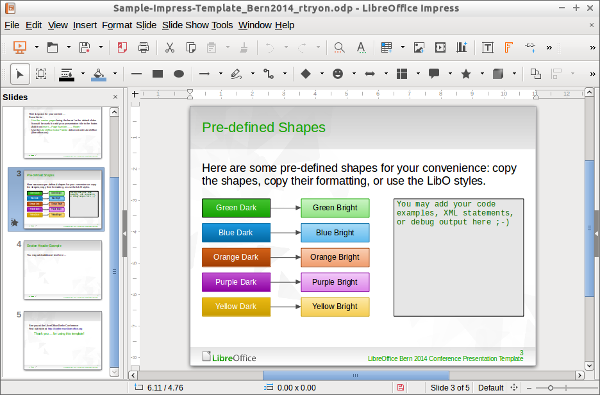
    screenshot of LibreOffice 5.2 alpha1
    LibreOffice 5.2 alpha1 – a development version currently available

    Pre-release development versions of LibreOffice are also available. To access these, visit the pre-releases server.

    Finally, for those who want to right on the bleeding edge of software development, there are nightly builds available, although it should be pointed out that both pre-release and nightly build versions are intended for technology enthusiasts and developers only; use in a production environment by users with average IT skills is not recommended.

  • Windows 10 update interrupts weather forecast

    Microsoft has a reputation for forcing unwanted updates and upgrades on users.

    Its actions reached a new nadir when it made Windows 10 a recommended update for users of earlier versions – 7 and 8.* – of its operating system.

    Since this occurred there have been numerous reports of the new operating system installing itself without either user consent or much warning.

    One of the most public of these attempted upgrades happened 2 days ago live on air at TV station KCCI of Des Moines, Iowa, as per the following screenshot.

    screenshot of Windows 10 update interrupting live TV weather forecast

    That’s right! With impeccable bad timing, Windows 10 update barged unannounced into Metinka Slater’s heavy rain and thunderstorms update. However, the TV meteorologist managed deal professionally with the unwelcome intrusion into her work and switch quickly to an alternative video source to continue her broadcast, as shown by the following video.

Posts navigation